Miru: Zoomer Daemon for Wayland
published:
So I recently started watching Tsoding streams and I saw him zoom into his screen quite a few times.
He used boomer a zoomer application he built himself.
That's kinda cool. Did you use it too ?
Well I tried. Turns out it was specific to X11 (His Void Linux setup). I use niri, a wayland compositor.
That's too bad. At least there is
XWaylandBridge right ?
Well, yeah. But there was one problem. It kinda worked. But not well enough. There were a lot of artifacts when I zoomed in, like text overlaying over each other. Also it was written in nim. The thing with nim is that a new release of the compiler almost always breaks the current code, so I noticed that it was not updated in quite some time since Tsoding is rewriting boomer to Jai 1.
I see. So what did you do ?
Well I started building my own of course.
Enter miru 2, which means To See in Japanese (日本語).
miru is written in C (cause why not ?). I am writing this mainly to learn some wayland functions and seeing how it differs from X11.
I'm recording my coding sessions and upload it to YouTube.
Here's the playlist: https://youtube.com/playlist?list=PLZraydlsV2t0&si=BIIOX1qWoA0dJnD2.
I made a logo for miru in fully ASCII art using durdraw 3 4
Working
So..How does it work ?
Well the working of miru, is very simple and it is so deliberately.
So when you build miru, you get 2 binaries : miru-daemon and miructl.
miru-daemon as the name suggests is a Daemon 5, so it runs in the background.
miructl is the control center. This is the one controlling the toggling of the overlay and the shutting down of the daemon via 2 commands
miructl toggle: Toggles the overlaymiructl quit: Shuts the daemon down.
[!NOTE] Make sure that
miru-daemonis running before usingmiructl
That makes sense. So how to configure it ?
Well that part is still being developed. I'll soon roll out a release which has a keybind to toggle the daemon.
The current workaround is to create a system-wide keybind in you Window Manager (niri, hyprland, sway etc.).
This is a niri example ~/.config/niri/config.kdl :
Mod+Z hotkey-overlay-title="toggle miru" {
  spawn-sh "/path/to/miru/build/miructl toggle";
}
Therefore, pressing Mod+Z (Mod key is the 🪟 key) toggles miructl for me and I can zoom in and out.
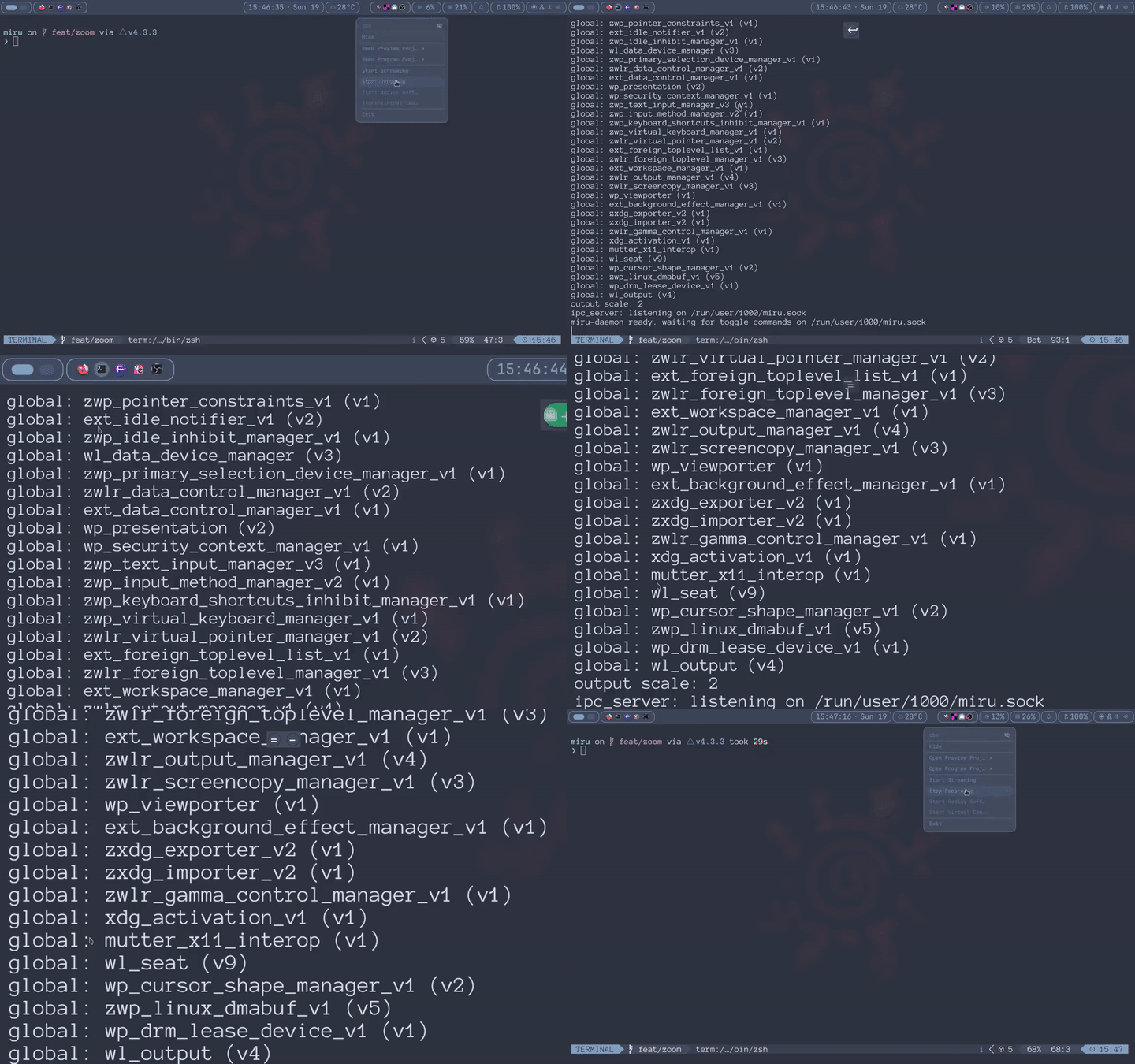
Here's the demo (Click on it to zoom) :
So what is the basic idea of the zoom, as in the steps it takes ?
The main thing it does is, it takes a snapshot of the current state of the screen and overlays it over my current screen. I am then able to zoom in and move about by tracking mu cursor position.
Why C
So what made you wanna use C ?
Well..cause why not ?
More seriously, one of the reasons I started miru was to learn how wayland actually works.
I could've used higher-level bindings or written it in Rust, but that would abstract away quite a bit of what I actually wanted to learn. With C, I get to work directly with wayland protocols, deal with buffers and surfaces myself, and generally find out exactly how much pain a compositor can inflict upon me.
Under the hood
So what exactly goes on when I press
Mod+Z
The basic idea is surprisingly simple.
When miructl toggle tells the daemon to activate the zoomer, miru-daemon captures the current state of the screen.
The captured frame is then displayed on an overlay surface covering the screen.
Instead of continuously magnifying the actual desktop underneath it, miru is essentially showing you a transformed version of that frozen frame.
When I zoom in miru changes which part of the frame is being displayed and how much it is scaled. The cursor position is used as the focal point, so moving the cursor lets me pan around the zoomed image.
So roughly
Screen
  |
  |
  ᐯ
Capture Frame
  |
  |
  ᐯ
Create Overlay
  |
  |
  ᐯ
Render captured frame
  |
  *-----> Zoom
  |
  *-----> Pan using cursor position
Well, that is pretty straightforward.
It was not.
What went wrong ?
Probably the most interesting part about building miru has been discovering all the ways such a simple idea could go wrong.
The screen capture feedback loop
My initial thought was to continuously capture the screen while the zoom overlay was active.
That seems logical, if the screen changes, the zoomed view should change too, right ?
Except there is now an overlay covering the screen .
So miru captures ... miru.
The captured overlay gets displayed as another overlay, which gets captured again, and things quickly stop being useful.
ALT+TAB made this particularly obvious, because changing windows while the overlay was active could leave miru effectively capturing it's own output.
The eventual solution was much simpler:
DO NOT continuously capture the screen.
Take one snapshot when zoom mode is enabled and freeze it until the overlay is closed.
Double Buffering
Then came buffers.
Initially I was rendering using a single buffer. That worked, until rendering and presentation started stepping on each other and visual artifacts appeared.
Just double buffer it ?
Well, I did exactly that.
Except, my first attempt at "double buffering" managed to fix the tearing while completely breaking panning.
Turns out having 2 buffers and actual "double buffering" are 2 completely different things.
The renderer needs to alternate correctly between the front and the back buffers: one can be displayed while the other is being prepared for the next frame. Once I fixed that life-cycle properly, both panning and rendering worked correctly.
HIDPI
Then I tested things with display scaling.
And suddenly the zoomer appeared to be permanently zoomed into one corner of the screen.
So it worked ?
Nope.
The problem was that wayland has a distinction between logical co-ordinates and the actual pixel dimensions of the buffer.
On a scaled display, something that is logically 1920 x 1080 does not necessary correspond to a 1920 x 1080 pixel buffer.
I was mixing those co-ordinate spaces.
The result looked like some mysterious zooming bug, but the actual problem was much less exciting: my maths was correct for the wrong co-ordinate system.
Once the buffer scale was accounted for properly, the mysterious permanent 2x zoom disappeared.
So
wayland scaling is fun.
No
Installing
There are multiple ways to to install miru:
Arch Linux
miru is available in the AUR in 2 variants
The latest release
paru -S miru-zoomThe development version
paru -S miru-zoom-gitHomebrew
brew install Vaishnav-Sabari-Girish/taps/miruNix Flake
- Run directly without installing
nix run github:Vaishnav-Sabari-Girish/miru            # Run miru-daemon by default
nix run github:Vaishnav-Sabari-Girish/miru#miructl # Run miructl- Install to your profile
nix profile install github:Vaishnav-Sabari-Girish/miru- For development
nix developFrom Source
git clone https://github.com/Vaishnav-Sabari-Girish/miru.git

cd miru
Using cmake
Building
# Using Ninja
cmake -S . -B build -G Ninja -DCMAKE_EXPORT_COMPILE_COMMANDS=ON

# Using Make
cmake -S . -B build -G "Unix Makefiles" -DCMAKE_EXPORT_COMPILE_COMMANDS=ON
Then run
cmake --build buildTo miru-daemon or miructl the binaries are there in the build/ directory
./build/miru-daemon
./build/miructl
Using Grimoire
To make things easier, you can build and run using grimoire 6 (A task runner similar to just and mise) as follows
# Build
grim cast build   # Or grim run build

# Run the daemon (miru-daemon)
grim cast run-daemon
miru is licensed under the MIT license, so feel free to poke around the source 2, modify it or use it as part of your own projects.
Is it finished ?
Not in the slightest.
The basic zoom functionality works, but there are somethings I wanna add and clean up.
The main feature I wanna implement is Spotlight Mode, where instead of magnifying the entire screen, miru highlights or magnifies the area around the cursor.
Configuration is pretty non-existent. I am planning to add a config file based workflow for adding custom keybinds and stuff like that.
There are already some Wayland zoomers out there. So where does
miru fit in?
There are. Two that I came across are woomer 7, which is written in Rust, and hyprmagnifier 8, which takes a somewhat different approach to screen magnification.
I'm not really trying to compete with either of them.
Both projects existed before miru, and I think having multiple implementations of the same general idea is a good thing, especially in the Wayland ecosystem where different compositors and use cases often require different approaches.
miru started because I wanted to understand Wayland better: how its protocols work, how buffers and surfaces are handled, and all the weird little problems that appear once you actually try building something with them.
If miru eventually becomes useful to other people too, that's a pretty nice side effect.
For now, though, I'm going to keep building it, breaking it, and figuring out why it broke.
Peace Out.
またね.
A daemon is a program that runs as a background process, rather than being under the direct control of an interactive user.